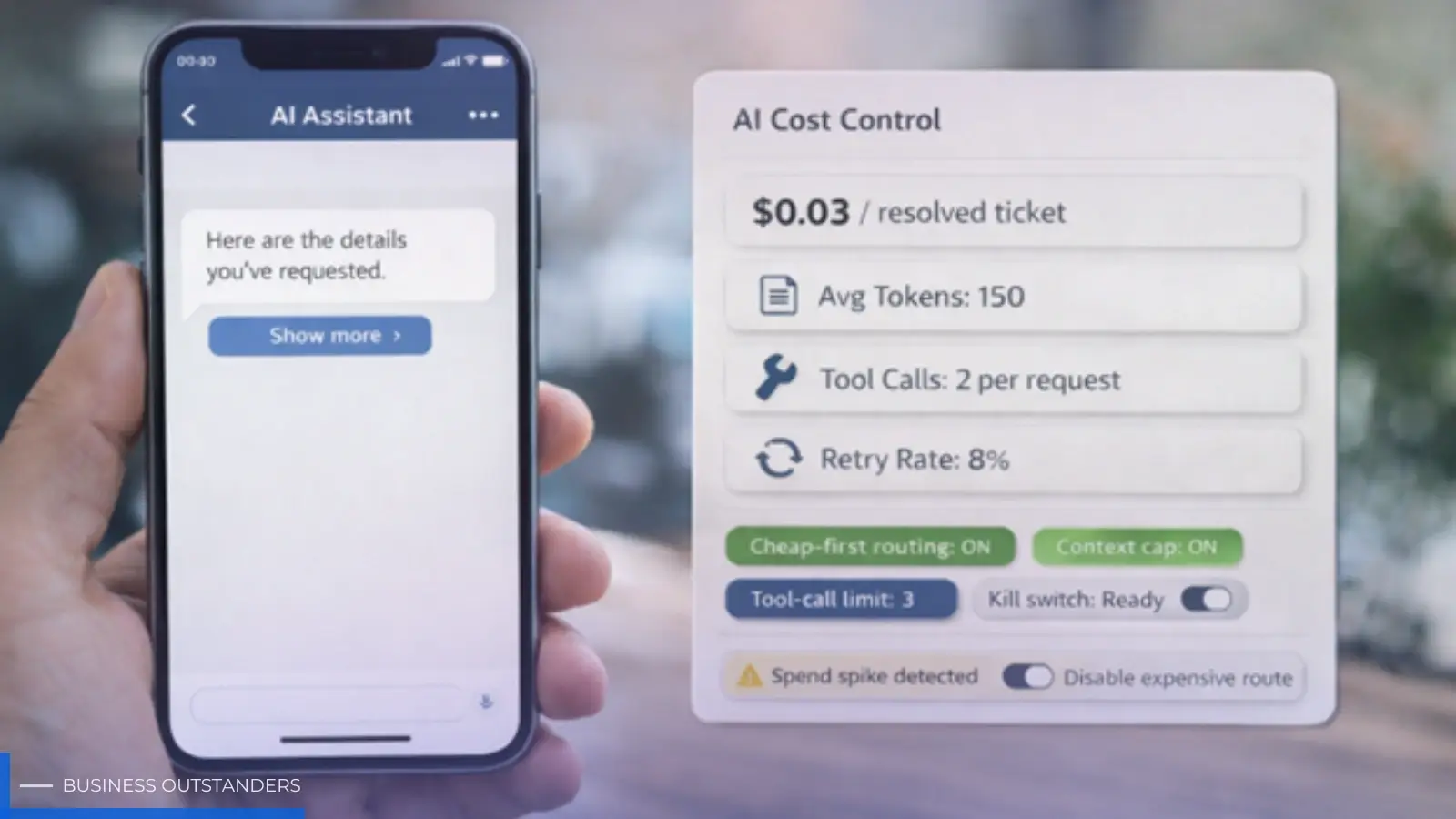
AI features make a mobile app feel smarter fast, which is why AI in mobile apps is becoming a major focus in modern development. A support assistant that actually helps. Search that understands intent. A “write this for me” button that saves users time.
Then the bill shows up.
Most teams don’t get crushed by AI costs because the model is “too expensive.” They get crushed because the system around the model is undisciplined. Conversations keep growing, users retry on spotty networks, tool calls multiply one action into five, and prompts bloat over time.
If you want AI in a mobile app that can scale past the first month, you need a cost plan that’s as real as your release plan.
Below is a practical way to do it.
1. Know the 4 places AI spend quietly explodes
Most runaway costs come from the same patterns. If you spot these early, you can fix them before usage grows.
Unbounded context
If you send the full chat history on every request, costs rise as the conversation gets longer. The user thinks they asked one question. Your system pays for 30 messages of history.
Mobile makes this worse because people love follow-ups. “Cool. Now do it again but shorter.” That’s more context and more output.
Retries and duplicate calls
Mobile users background the app, switch networks, lose signal, or tap again because nothing happened. If you’re not deduping requests, you can pay twice for one user action.
This is the most common “why did costs double?” story I see.
Tool call loops
Once your AI can call tools (product search, order lookup, calendar, CRM, internal APIs), each user request can trigger multiple model calls plus multiple tool calls.
Tool calling is powerful. It’s also where costs and latency jump if you don’t put guardrails on it.
Prompt bloat
Teams keep adding rules, examples, and “just one more instruction” to prompts. Quality improves, but you pay for that text on every request.
If the prompt repeats the same blocks constantly, you’re buying the same tokens over and over.
2. Set a budget per outcome, not per request
“Cost per request” isn’t a business metric. It doesn’t tell you if the feature is worth it.
A better question is: what does this AI feature accomplish, and what can we afford for that outcome?
Examples:
- cost per resolved support issue
- cost per completed booking
- cost per recovered checkout
- cost per qualified lead
Once you choose the unit, set two numbers:
- a target cost (what “healthy” looks like)
- a ceiling (the point where you intervene)
This gives you a real decision framework. If the feature is over ceiling, you don’t argue. You adjust routing, context, tool calls, or output length.
3. Route cheaply first, then earn the expensive model
Most apps don’t need the top model for most requests.
The teams that stay cost-stable use tiers.
A simple pattern that works:
- A small router step decides what the user is trying to do (intent and risk)
- A mid-tier model handles most everyday requests
- A premium model is used only when a request clearly needs it
The key is making escalation measurable.
If you can’t explain why a request went to the expensive tier, routing isn’t real. It’s just “always expensive.”
Practical escalation reasons you can log:
- the user asked for multi-step reasoning
- the request involves sensitive data or higher risk
- the user is premium
- tool use is required
If your escalation rate is 90%, you don’t have a tiered system. You have a cost leak.
4. Put a hard limit on context, but keep it feeling smart
Users want the assistant to remember things. They don’t need the entire transcript.
A mobile-friendly approach that stays usable:
- keep a rolling summary (short, updated every few turns)
- include only the last 5 to 10 messages
- retrieve relevant records on demand (order details, policy snippets) instead of pasting huge blocks
This does two things:
- costs stop growing linearly with conversation length
- latency stays predictable
A real example: a customer support assistant doesn’t need the entire chat. It needs the current issue summary and the user’s last order status. Everything else is noise.
5. Control output length without making replies feel robotic
Output tokens are often where costs spike, especially when users ask for “more detail.”
The fix isn’t “always be short.” The fix is setting sensible defaults and letting users pull more when they want.
A practical pattern:
- default to a short answer plus one next step
- offer “show more” or “expand” for longer detail
This keeps costs down while still giving users depth when they actually want it.
It also makes mobile UX better. Long walls of text on a phone are usually not helpful.
6. Caching is the boring lever that saves real money
Most AI requests include repeated text:
- system instructions
- formatting rules
- policy blocks
- prompt templates
If you can cache those repeated inputs (or template them server-side so you’re not resending them), you cut costs without changing the user experience.
The important boundary: never cache anything user-specific or sensitive. Cache the stable scaffolding.
Think of it like performance work. Nobody is excited by caching, but everyone is happy when the app stays fast and affordable.
7. Guardrails that prevent surprise bills
Even a good design can blow up under real mobile conditions if you don’t set limits.
The minimum set worth having:
- token caps per request (input and output)
- timeouts with a fallback (FAQ, search, or human handoff)
- tool call limits per user action
- retry rules with exponential backoff
- request deduping with a request_id
- kill switch to disable an expensive path without an app update
A kill switch sounds dramatic, but it’s the opposite. It’s what keeps incidents calm.
If costs spike or latency tanks, you flip one switch and reduce blast radius while you fix the root cause.
This is the kind of operational detail that often gets skipped in MVP builds, which is why working with an experienced mobile app development team can pay off fast when the feature hits real traffic.
8. Track the right metrics, in the same dashboard as UX
If you only look at costs once a month, you’ll always be late.
Put cost signals next to product signals:
- cost per successful task
- average tokens per flow
- escalation rate to premium tier
- tool call count per request
- retry rate and dedupe rate
- drop-off rate after AI responses (did the AI help or frustrate?)
When a metric crosses the ceiling, your response should be operational, not emotional:
- shorten context
- tighten routing
- reduce tool calls
- force a cheaper tier for low-risk requests
This turns cost control into a normal part of running the product.
9. A clean launch order that keeps you in control
If you want a simple plan that works in the real world:
- Start with one AI use case that clearly helps users
- Set a budget per successful outcome
- Ship cheap-first routing and token caps on day one
- Add context limits (summary + last N messages)
- Add caching for repeated prompt blocks
- Add tool call limits and a kill switch
- Review cost-per-task weekly and tune
This keeps AI from becoming an unbounded cost machine.
If you need help implementing these guardrails end to end, work with a mobile app development team that has shipped AI into production and stayed responsible for costs after launch.
The goal is predictable AI, not perfect AI
Most teams don’t lose because their AI answers are slightly imperfect. They lose because the feature becomes slow, expensive, and unreliable under real usage.
If you route cheaply first, cap context, control tool calls, and build a kill switch, you get something far more valuable than a flashy demo. You get an AI feature you can afford to keep on.
That’s the difference between “we tried AI” and “AI is now part of the product.”
Author: Aaron Gordon
Aaron Gordon is the COO of AppMakers USA, where he leads product strategy and client partnerships across the full lifecycle, from early discovery to launch. He helps founders translate vision into priorities, define the path to an MVP, and keep delivery moving without losing the point of the product. He grew up in the San Fernando Valley and now splits his time between Los Angeles and New York City, with interests that include technology, film, and games.
Business Outstanders brings you sharp insights on tech, business, entrepreneurship, law, crypto, and more. We uncover what’s next. Stay updated, sign up for our newsletter and be part of the future!